> ## Documentation Index
> Fetch the complete documentation index at: https://docs.slai.io/llms.txt
> Use this file to discover all available pages before exploring further.
# Webhook
> Deploy async functions on Beam
### Deploying a Webhook
Webhooks are used for deploying functions that run asyncronously on Beam.
You can add webhook triggers to the file with your Beam app definition.
Input fields are serialized and validated by the [`Beam.Types`](/beam/triggers/webhook#beam-types) module.
```python theme={null}
app.Trigger.Webhook(
inputs={"prompt": beam.Types.String()},
handler="run.py:my_async_function",
)
```
| Name | Type | Description |
| --------- | -------- | ----------------------------------------------------- |
| `inputs` | *dict* | A dictionary specifying the interface for the API |
| `handler` | *string* | The function that will be run when the API is invoked |
### Invoking Webhooks
Calling a webhook will return a Task ID.
 You can view the status of each invocation in the dashboard, by clicking on your deployment and navigating to the latest task.
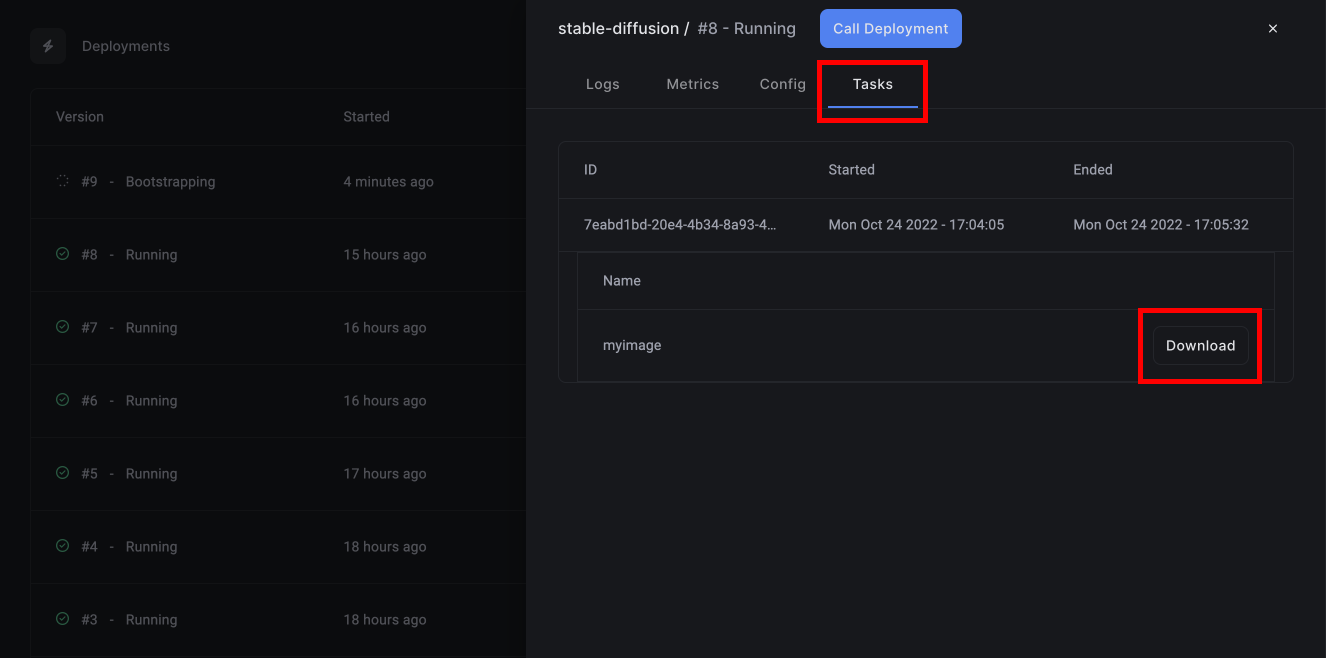 If any files were generated during the execution of your task, you can download them by clicking on the task, and clicking **Download**.
### Beam Types
The **beam** library includes several basic data types that can be used to
validate your inputs against.
| Type | Description |
| ----------------------------------------------- | -------------------------------------------------------------------------------------------------- |
| `beam.types.Json()` | A JSON object |
| `beam.types.String(max_length=None)` | A string field, with an optional max\_length parameter |
| `beam.types.Float()` | Standard floating point value |
| `beam.types.Boolean()` | Standard boolean value |
| `beam.types.Tensor(shape=None, dtype=None)` | A torch tensor object, with optional shape and dtype parameters |
| `beam.types.Dataframe()` | A pandas dataframe object |
| `beam.types.NumpyArray(shape=None, dtype=None)` | A numpy array, with optional shape and dtype parameters |
| `beam.types.Binary()` | A binary object, for example a video file or anything that doesn't fit into the other types listed |
| `beam.types.Image(raw=False)` | A generic image, automatically serialized into a PIL object for use in the handler |
Types can be labeled optional by passing in `required=false`
`beam.types.Boolean(required=false)`
`beam.types.Dataframe(required=false)`
If any files were generated during the execution of your task, you can download them by clicking on the task, and clicking **Download**.
### Beam Types
The **beam** library includes several basic data types that can be used to
validate your inputs against.
| Type | Description |
| ----------------------------------------------- | -------------------------------------------------------------------------------------------------- |
| `beam.types.Json()` | A JSON object |
| `beam.types.String(max_length=None)` | A string field, with an optional max\_length parameter |
| `beam.types.Float()` | Standard floating point value |
| `beam.types.Boolean()` | Standard boolean value |
| `beam.types.Tensor(shape=None, dtype=None)` | A torch tensor object, with optional shape and dtype parameters |
| `beam.types.Dataframe()` | A pandas dataframe object |
| `beam.types.NumpyArray(shape=None, dtype=None)` | A numpy array, with optional shape and dtype parameters |
| `beam.types.Binary()` | A binary object, for example a video file or anything that doesn't fit into the other types listed |
| `beam.types.Image(raw=False)` | A generic image, automatically serialized into a PIL object for use in the handler |
Types can be labeled optional by passing in `required=false`
`beam.types.Boolean(required=false)`
`beam.types.Dataframe(required=false)`