> ## Documentation Index
> Fetch the complete documentation index at: https://docs.slai.io/llms.txt
> Use this file to discover all available pages before exploring further.
# Stable Diffusion API
> Building an API to generate images with stable diffusion
### Define the environment
First, create a file with your Beam App definition. You can name this whatever
you want. In this example, name it `app.py`.
```python app.py theme={null}
import beam
# The environment your code will run on
app = beam.App(
name="stable-diffusion",
cpu=4,
memory="16Gi",
gpu=1,
python_version="python3.8",
python_packages=["diffusers", "transformers", "torch", "pillow"],
)
# Deploys function as async webhook
app.Trigger.Webhook(
inputs={"prompt": beam.Types.String()},
outputs={},
handler="run.py:generate_image"
)
# File to store image outputs
app.Output.File(path="output.png", name="myimage")
# Persistent volume to store cached model
app.Mount.PersistentVolume(app_path="./cached_models", name="cached_model")
```
### Inference Function
Write a simple function that takes a prompt passed from the user, and returns an image generated using Stable Diffusion.
You need an access token from Huggingface to run this example. You can sign up
for Huggingface and access your token on [the settings
page](https://huggingface.co/settings/tokens), and store it in the [Beam
Secrets Manager](/beam/account/secrets-management).
Notice the `image.save()` method below. You defined a file path called `output.png` in `app.py`, and that's where your images will be saved.
```python run.py theme={null}
import os
# Specify the HuggingFace model cache before the diffusers library is imported
os.environ["TRANSFORMERS_CACHE"] = "/workspace/cached_models"
os.environ["HF_HOME"] = "/workspace/cached_models"
import torch
from torch import autocast
from diffusers import StableDiffusionPipeline
from PIL import Image
def generate_image(**inputs):
pipe = StableDiffusionPipeline.from_pretrained(
"CompVis/stable-diffusion-v1-4",
torch_dtype=torch.float16,
revision="fp16",
# Add your own access token from Huggingface
use_auth_token=os.environ["HUGGINGFACE_API_KEY"],
).to("cuda")
prompt = inputs["prompt"]
with autocast("cuda"):
image = pipe(prompt, guidance_scale=7.5).images[0]
print(image)
image.save("output.png")
```
### Deploying the API
In your teriminal, run:
```curl theme={null}
beam deploy app.py
```
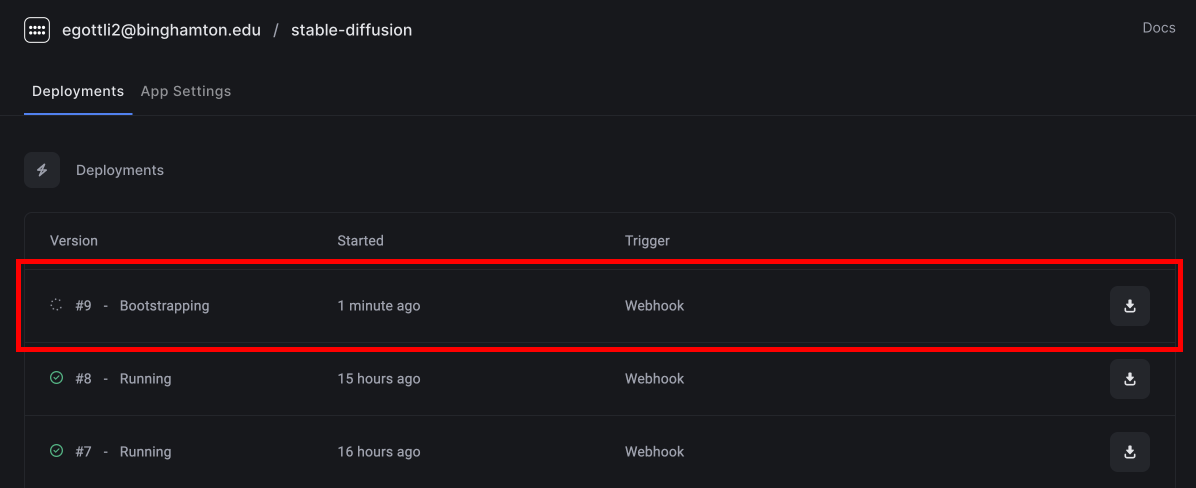
You'll see the deployment appear in the dashboard.
 ### Generating images
In the dashboard, click **Call API** to view the API URL.
### Generating images
In the dashboard, click **Call API** to view the API URL.
 Paste the code into your terminal to make a request.
```curl theme={null}
curl -X POST --compressed "https://beam.slai.io/jrg5v" \
-H 'Accept: */*' \
-H 'Accept-Encoding: gzip, deflate' \
-H 'Authorization: Basic [YOUR_AUTH_TOKEN]' \
-H 'Connection: keep-alive' \
-H 'Content-Type: application/json' \
-d '{"prompt": "a renaissance style photo of steve jobs"}'
```
The API returns a Task ID.
```json theme={null}
{ "task_id": "edbcf7ff-e8ce-4199-8661-8e15ed880481" }
```
### Querying the status of a job
You will use the `/task` API to retrieve the status of a job, passing in the Task ID.
```curl theme={null}
curl -X POST --compressed "https://api.slai.io/beam/task" \
-H 'Accept: */*' \
-H 'Accept-Encoding: gzip, deflate' \
-H 'Authorization: Basic [YOUR_AUTH_TOKEN]' \
-H 'Content-Type: application/json' \
-d '{
"action": "retrieve",
"task_id": "edbcf7ff-e8ce-4199-8661-8e15ed880481"
}'
```
This returns the generated image in the `outputs` dictionary, as a pre-signed URL.
```json theme={null}
{
"outputs": {
"myoutput": "https://beam-data.slai.io/beam.slai.io/z6sks/outputs/z6sks-0041/53b8338c-d905-4356-845d-a259ec279cab/myoutput.zip"
},
"started_at": "2022-11-04T19:43:25.668303Z",
"ended_at": "2022-11-04T19:43:26.017401Z",
"task_id": "edbcf7ff-e8ce-4199-8661-8e15ed880481"
}
```
Paste the code into your terminal to make a request.
```curl theme={null}
curl -X POST --compressed "https://beam.slai.io/jrg5v" \
-H 'Accept: */*' \
-H 'Accept-Encoding: gzip, deflate' \
-H 'Authorization: Basic [YOUR_AUTH_TOKEN]' \
-H 'Connection: keep-alive' \
-H 'Content-Type: application/json' \
-d '{"prompt": "a renaissance style photo of steve jobs"}'
```
The API returns a Task ID.
```json theme={null}
{ "task_id": "edbcf7ff-e8ce-4199-8661-8e15ed880481" }
```
### Querying the status of a job
You will use the `/task` API to retrieve the status of a job, passing in the Task ID.
```curl theme={null}
curl -X POST --compressed "https://api.slai.io/beam/task" \
-H 'Accept: */*' \
-H 'Accept-Encoding: gzip, deflate' \
-H 'Authorization: Basic [YOUR_AUTH_TOKEN]' \
-H 'Content-Type: application/json' \
-d '{
"action": "retrieve",
"task_id": "edbcf7ff-e8ce-4199-8661-8e15ed880481"
}'
```
This returns the generated image in the `outputs` dictionary, as a pre-signed URL.
```json theme={null}
{
"outputs": {
"myoutput": "https://beam-data.slai.io/beam.slai.io/z6sks/outputs/z6sks-0041/53b8338c-d905-4356-845d-a259ec279cab/myoutput.zip"
},
"started_at": "2022-11-04T19:43:25.668303Z",
"ended_at": "2022-11-04T19:43:26.017401Z",
"task_id": "edbcf7ff-e8ce-4199-8661-8e15ed880481"
}
```