> ## Documentation Index
> Fetch the complete documentation index at: https://docs.slai.io/llms.txt
> Use this file to discover all available pages before exploring further.
# Deploying an ML Model
> A short tutorial on building a sentiment analysis model and deploying it as a REST API with Beam
### Define the environment
The first thing we'll do is define the environment that our app will run on. For
this example, we're building a Sentiment Analysis model using Huggingface.
First, create a file with your Beam App definition. You can name this whatever
you want. In this example, we'll call it `app.py`.
```python app.py theme={null}
import beam
app = beam.App(
name="sentiment-analysis-app",
cpu=4,
memory="4Gi",
gpu=0,
python_version="python3.8",
python_packages=["transformers", "torch", "numpy"],
)
```
### Invoking the Huggingface Model
Now, we'll write some code to predict the sentiment of a given text prompt.
Create a new file. Again, you can name this whatever you want. We'll name ours
`inference.py`
Our function takes keyword arguments, as `(**inputs)`.
```python inference.py theme={null}
from transformers import pipeline
def predict_sentiment(**inputs):
model = pipeline(
"sentiment-analysis", model="siebert/sentiment-roberta-large-english"
)
result = model(inputs["text"], truncation=True, top_k=1)
prediction = {i["label"]: i["score"] for i in result}
print(prediction)
return {"prediction": prediction}
```
### Setting a REST API Trigger
To deploy the API, we'll create a REST API **Trigger** in our `app.py`.
Our trigger requires three things:
* **Inputs -** *the name and type of all* ***inputs*** *to the API*
* **Outputs** - *the name and type of all* ***outputs*** *returned from the
API*
* **Handler** - *the file and function to be invoked when the API is called*
Add the following lines to your `app.py` file:
```python app.py theme={null}
app.Trigger.RestAPI(
inputs={"text": beam.Types.String()},
outputs={"prediction": beam.Types.String()},
handler="inference.py:predict_sentiment",
)
```
### (Optional) Caching Model on Disk
For performance reasons, you want to store the model on disk rather than downloading it from HuggingFace for each request.
Create a **[Persistent Volume](/beam/data/persistent-volumes)** to store the model weights.
Add the following lines to your `app.py`:
```python app.py theme={null}
app.Mount.PersistentVolume(app_path="./cached_models", name="cached_model")
os.environ["TRANSFORMERS_CACHE"] = "/workspace/cached_models"
```
The complete `app.py` file will look like this:
```python app.py theme={null}
import os
import beam
app = beam.App(
name="sentiment-analysis",
cpu=4,
memory="4Gi",
gpu=0,
python_version="python3.9",
python_packages=["transformers", "torch"],
)
app.Trigger.RestAPI(
inputs={"text": beam.Types.String()},
outputs={"prediction": beam.Types.String()},
handler="inference.py:predict_sentiment",
)
app.Mount.PersistentVolume(app_path="./cached_models", name="cached_model")
os.environ["TRANSFORMERS_CACHE"] = "/workspace/cached_models"
```
### Deploying the app
To deploy the model, enter your terminal and `cd` to the directory you're
working on.
Then, run the following:
```
beam deploy app.py
```
Once you deploy, you'll see the following console output:
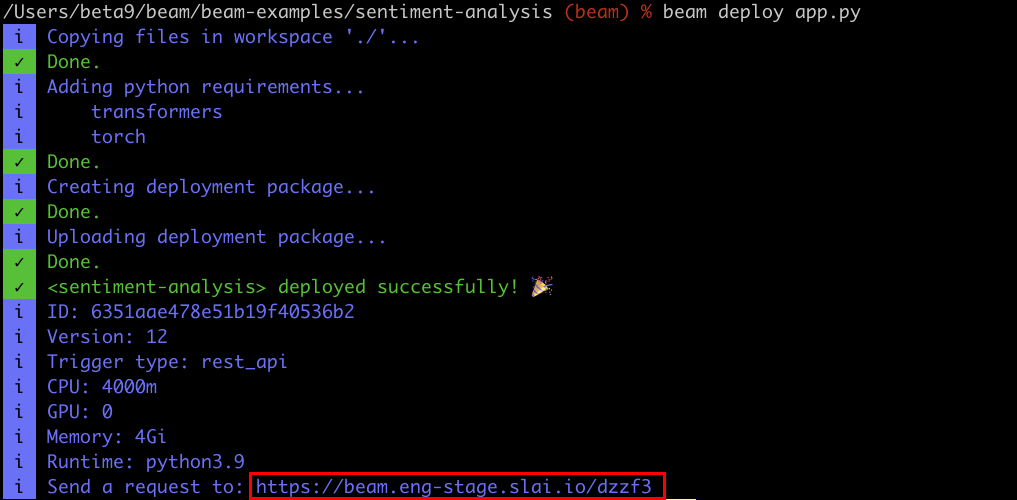 At the bottom of the console, you'll see a URL for invoking your function.
Here's what a cURL request would look like:
```bash theme={null}
curl -X POST --compressed "https://beam.slai.io/kajru" \
-H 'Accept: */*' \
-H 'Accept-Encoding: gzip, deflate' \
-H 'Authorization: Basic YWJmNWVhYjhjY2VkZTQ3ZDJmZWU4NTYyNTliYWU3NDA6ZTE0ZTE0MTY0M2NmYzkxNDdkMDM1MzZkNDdjYzRkMGI=' \
-H 'Connection: keep-alive' \
-H 'Content-Type: application/json' \
-d '{"text": "If we override the bandwidth, we can get to the SMTP capacitor through the cross-platform RSS alarm!"}'
```
**The requests are authenticated with basic auth.** Your username is your ClientID, and password is your Client Secret.
Congrats - you just deployed your first function on Beam!
At the bottom of the console, you'll see a URL for invoking your function.
Here's what a cURL request would look like:
```bash theme={null}
curl -X POST --compressed "https://beam.slai.io/kajru" \
-H 'Accept: */*' \
-H 'Accept-Encoding: gzip, deflate' \
-H 'Authorization: Basic YWJmNWVhYjhjY2VkZTQ3ZDJmZWU4NTYyNTliYWU3NDA6ZTE0ZTE0MTY0M2NmYzkxNDdkMDM1MzZkNDdjYzRkMGI=' \
-H 'Connection: keep-alive' \
-H 'Content-Type: application/json' \
-d '{"text": "If we override the bandwidth, we can get to the SMTP capacitor through the cross-platform RSS alarm!"}'
```
**The requests are authenticated with basic auth.** Your username is your ClientID, and password is your Client Secret.
Congrats - you just deployed your first function on Beam!